What Is Wi-Fi Direct: Soft AP and Pairing
Wi-Fi Direct connects phones, printers, cameras, and Miracast TVs directly without a wireless router using an embedded WPA2 software access point.
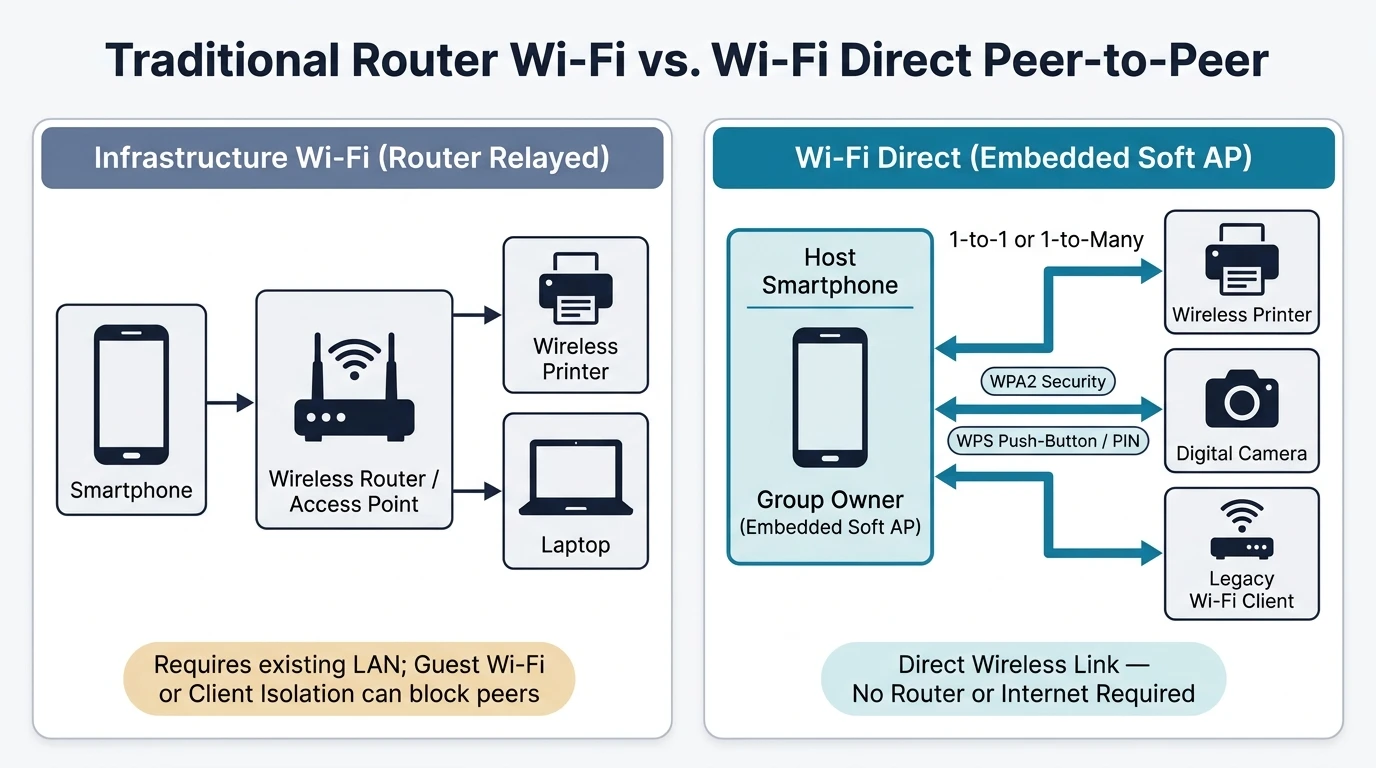
Wi-Fi Direct is a Wi-Fi Alliance wireless standard that allows two devices to establish a direct wireless connection without an intermediary wireless access point, standalone router, or Internet connection. One participating device embeds a software access point with WPA2 security and Wi-Fi Protected Setup push-button or PIN pairing so nearby peers connect directly.
Wi-Fi Direct pairs certified devices one-to-one or one-to-many—and accepts legacy Wi-Fi client devices—for direct file sharing, wireless printing, camera uploads, and Miracast display streaming without a router. Keeping normal home Wi-Fi Internet access active at the same time depends on the certified device's cross-connection implementation, while Apple iOS uses proprietary AirDrop and wireless LAN AirPrint instead of standard Wi-Fi Direct.
Does Wi-Fi Direct Work Without an Internet Router?
Yes—Wi-Fi Direct operates completely without an external wireless router, standalone access point, or active Internet connection because a participating device embeds its own software access point (Soft AP) to host nearby peers directly over WPA2 encrypted wireless sessions configured through push-button or PIN-based Wi-Fi Protected Setup.
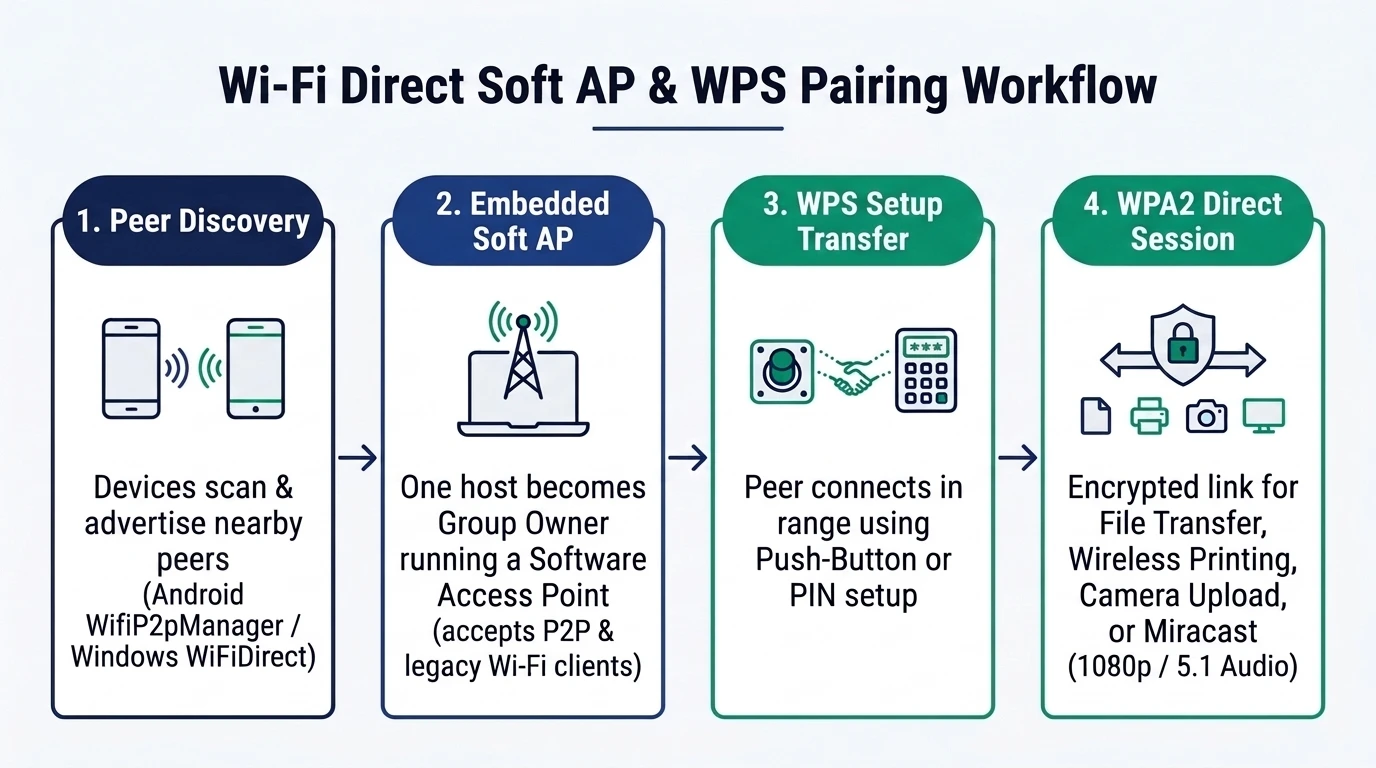
Developed and administered under a certification program by the Wi-Fi Alliance, with initial certified products announced in October 2010, Wi-Fi Direct eliminates the dependency on pre-existing local network hardware. When a compatible phone, printer, or computer enters range of the Wi-Fi Direct host, its embedded Soft AP supplies a version of Wi-Fi Protected Setup (WPS) using either push-button confirmation or PIN entry so the peer gathers connection parameters and establishes an encrypted link.
Not every connected product in a session has to carry Wi-Fi Direct certification. Certified hosts support both one-to-one and one-to-many group topologies, and a single Wi-Fi Direct-enabled Group Owner can accept connections from legacy Wi-Fi-certified client devices. Link security incorporates WPA2 encryption alongside access-control features designed for corporate network environments.
| Connection Attribute | Infrastructure Router Wi-Fi | Wi-Fi Direct Embedded Soft AP |
|---|---|---|
| Intermediary Hardware | Requires standalone wireless router or access point | Zero standalone router or external access point needed |
| Group Topology | Central hardware access point serving LAN clients | One-to-one or one-to-many direct peer group |
| Onboarding Mechanism | Pre-shared network passphrase or enterprise credentials | Wi-Fi Protected Setup (WPS) push-button or PIN transfer |
| Link Encryption | Router-configured wireless security policy | Built-in WPA2 security and corporate access controls |
| Legacy Device Support | Standard Wi-Fi stations join the hardware router | One Wi-Fi Direct host accepts legacy Wi-Fi-certified clients |
| Peer Isolation Behavior | Guest Wi-Fi or router client isolation can block peers | Direct host-to-peer link bypasses router client isolation |
How Is Wi-Fi Direct Used Between Everyday Devices?
Everyday devices use Wi-Fi Direct for routerless wireless file sharing, direct wireless printing, digital camera image uploads, Miracast 1080p video and 5.1 surround-sound screen mirroring, low-latency game controller links, and Windows peripheral connections whenever an existing local area network is absent or restricted.
For portable transfers and office peripherals, Wi-Fi Direct lets nearby smartphones, laptops, and wireless printers exchange documents or print jobs directly without joining a shared building network. Embedded Soft AP implementations scale to match the hardware role: a simple Soft AP inside a basic receiver—such as a digital picture frame—provides only the core local services required for digital cameras to connect directly and upload images.
Miracast Screen Mirroring, Controllers, and Windows Enumeration
Introduced by the Wi-Fi Alliance on 19 September 2012, Miracast is a wireless peer-to-peer screen mirroring and audio/video streaming standard built directly on Wi-Fi Direct, WPS, and H.264/MPEG-4 AVC compression. Because Miracast negotiates its link over Wi-Fi Direct, compatible phones and PCs stream up to 1080p HD video and 5.1 surround sound directly to a television or projector without routing frames through a home router. When wireless casting is unsuitable for an external monitor, check native wired video compatibility in the USB-C to HDMI DisplayPort Alt Mode guide.
Gaming hardware and desktop operating systems also build on the standard for peripheral links:
- Console and Low-Latency Controllers: The Xbox One, released in 2013, supports Wi-Fi Direct for wireless peripheral connectivity, and NVIDIA’s SHIELD controller uses Wi-Fi Direct to connect to compatible devices with lower latency and higher throughput than competing Bluetooth controllers.
- Windows Device Discovery and Pairing: Windows exposes the Windows.Devices.WiFiDirect namespace to enumerate and connect to Wi-Fi Direct-capable devices and peripherals, using WiFiDirectAdvertisementPublisher to broadcast Wi-Fi Direct advertisements and WiFiDirectConnectionListener to handle incoming connection requests.
Can a Phone Use Wi-Fi Direct and Normal Wi-Fi at the Same Time?
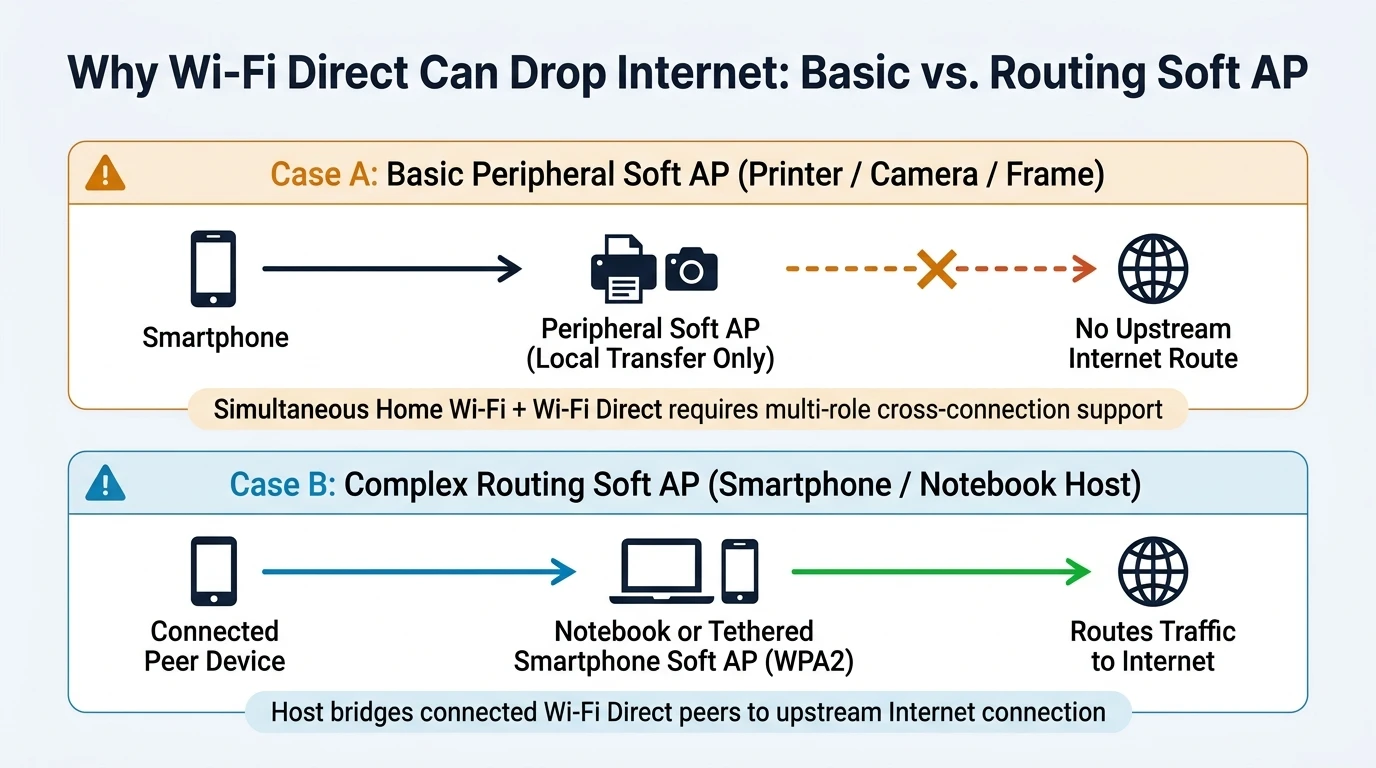
Whether a phone can keep normal infrastructure Wi-Fi Internet access active while connected over Wi-Fi Direct depends on the certified device’s cross-connection implementation and multi-mode wireless framework; joining a peripheral’s basic Soft AP without simultaneous cross-connection routes local transfers only and suspends normal Wi-Fi Internet access.
Under Wi-Fi Alliance certification, whether a Wi-Fi Direct peer group can cross-connect to an infrastructure Wi-Fi network for simultaneous Internet connectivity depends on how the certified device implements multi-role operation. On Android handsets, the Wi-Fi framework coordinates infrastructure station mode, hotspot Soft AP modes, and Wi-Fi Direct peer-to-peer sessions through system services and hardware abstraction interfaces. If a user manually connects a phone’s primary Wi-Fi client straight to a printer’s or camera’s basic Soft AP SSID as though it were a home router, the handset may lose upstream Internet access until the local job finishes because that peripheral Soft AP carries no Internet route.
Direct peer links remain valuable even inside buildings with Wi-Fi coverage. On standard local Wi-Fi networks, guest Wi-Fi policies or router client isolation frequently block peer-to-peer local transfers between two devices on the same SSID, as outlined on the mobile-to-PC connectivity hub. Regardless of whether you transfer archives over LAN Wi-Fi or Wi-Fi Direct, an advertised wireless link rate does not guarantee actual file-transfer throughput—verify real performance with a test file copy under working conditions.
Can Wi-Fi Direct Share a Mobile Internet Connection?
Wi-Fi Direct shares an Internet connection only when the Group Owner runs a complex routing Soft AP—such as a tethering-enabled smartphone or a notebook computer acting as a software access point—whereas basic peripheral Soft APs on cameras, frames, or printers handle local transfers without Internet routing.
Soft AP complexity in Wi-Fi Direct varies directly with the host device’s role:
- Basic Peripheral Soft AP (Local Transfer Only): Devices such as digital picture frames, digital cameras, and wireless printers run simple Soft APs limited to local pairing, image uploads, or print spooling without upstream network routing.
- Tethered Smartphone Complex Soft AP: A smartphone that supports data tethering can run a more complex Soft AP that adds the ability to route traffic to the Internet for connected peers under WPA2 protection.
- Notebook Computer Software Access Point: Wi-Fi Direct devices can connect one-to-one or one-to-many to a notebook computer acting as a software access point, and that notebook computer can provide Internet access to connected Wi-Fi Direct devices without a separate hardware Wi-Fi access point.
Why Does iPhone Handle Peer-to-Peer Sharing Differently From Wi-Fi Direct?
Apple iOS devices do not implement standard Wi-Fi Direct; instead, iPhones and iPads rely on Apple’s proprietary peer-to-peer protocol and AirDrop—using Bluetooth discovery, direct routerless Wi-Fi, a connection firewall, and TLS file encryption—alongside AirPrint for driverless printing across a shared wireless local area network.
Because iOS omits standard Wi-Fi Direct, an iPhone will not pair natively with an Android phone’s standard Wi-Fi Direct peer menu. First released on July 20, 2011, AirDrop serves as Apple’s proprietary peer-to-peer feature for sharing links, contacts, and large files between Apple devices without network infrastructure. AirDrop uses Bluetooth to detect nearby Apple hardware, establishes a direct peer-to-peer Wi-Fi connection without a wireless router, builds a firewall around the session, and encrypts transferred files using TLS. For printing, Apple builds AirPrint into macOS, iOS, and iPadOS to print over a wireless LAN without installing printer-specific drivers.
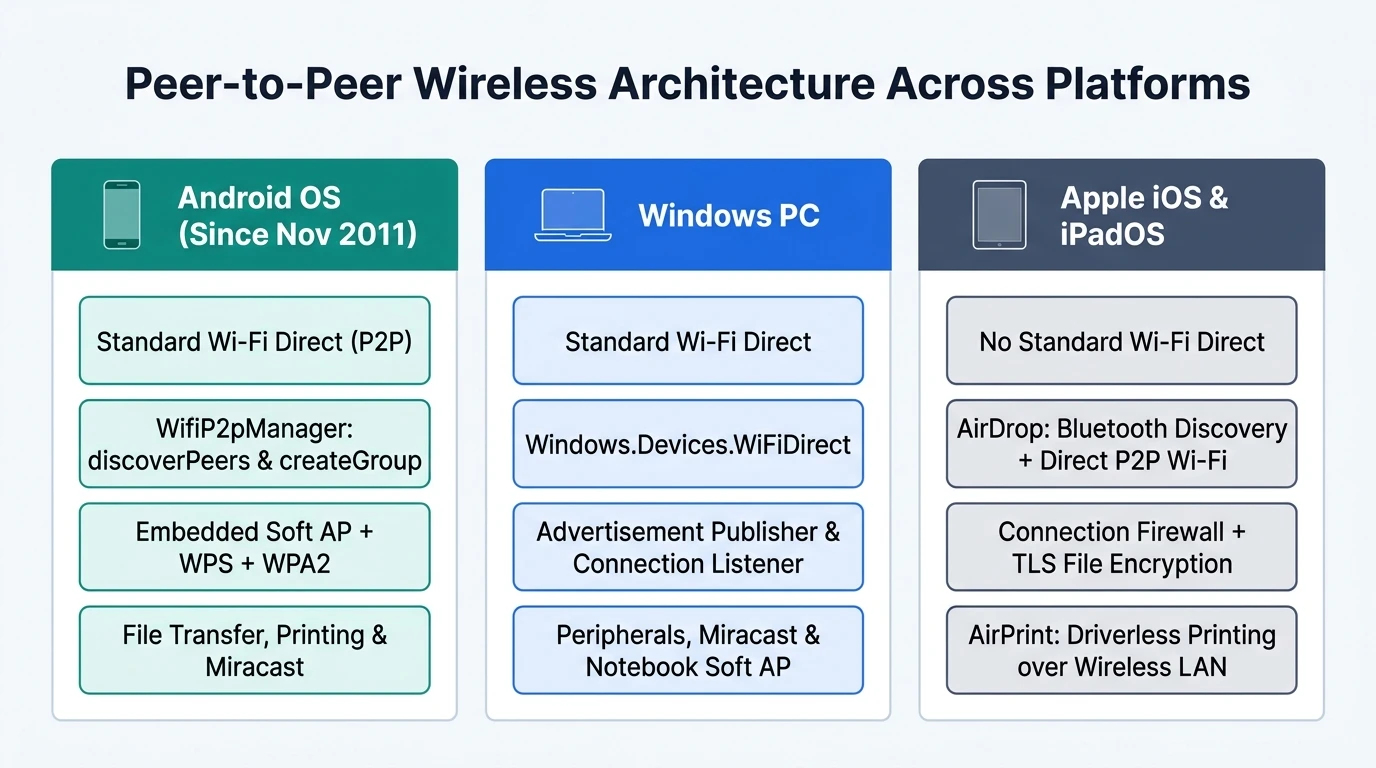
| Platform Ecosystem | Native Wi-Fi Direct Support | Discovery and Session Mechanism | Encryption and Printing Path |
|---|---|---|---|
| Android (Since Nov 2011) | Standard Wi-Fi Direct via WifiP2pManager | Asynchronous discoverPeers scan and createGroup Soft AP | WPA2 + WPS direct peer link and direct wireless printing |
| Windows PC | Standard Wi-Fi Direct via Windows.Devices.WiFiDirect | WiFiDirectAdvertisementPublisher and WiFiDirectConnectionListener | WPA2 + WPS peripheral pairing, Miracast, and notebook Soft AP |
| Apple iOS and iPadOS | Omitted (proprietary Apple peer-to-peer protocol) | AirDrop (released July 20, 2011): Bluetooth detection + direct P2P Wi-Fi | Session firewall + TLS file encryption; AirPrint over wireless LAN |
How Does Wi-Fi Direct Work on Android Phones and Wireless Printers?
Native Wi-Fi Direct on Android—first shipped by Google in November 2011—uses the WifiP2pManager service to discover nearby peers asynchronously with discoverPeers or establish an autonomous Group Owner Soft AP via createGroup, enabling direct WPA2 wireless printing, file transfers, and legacy Wi-Fi client connections without a router.
When pairing an Android phone with a nearby wireless printer or second Android handset, Android’s Wi-Fi system services coordinate peer discovery before negotiating the group role. Calling discoverPeers through WifiP2pManager scans asynchronously for nearby Wi-Fi Direct peers in range, after which WPS push-button or PIN confirmation completes WPA2 session setup. When connecting a legacy Wi-Fi client device that lacks peer-to-peer hardware, Android’s createGroup method lets the Wi-Fi Direct phone become the Group Owner immediately so the legacy client joins its Soft AP like a conventional wireless network.
When wireless casting or peer-to-peer transfer does not fit a desk workflow—such as zero-lag external display output or full keyboard-and-mouse Android screen control—switch to a wired connection via the USB-C to HDMI adapter compatibility guide or set up an authorized workstation bridge with scrcpy using the Android USB debugging and ADB authorization guide.
Phone-to-Peripheral Pairing and Concurrency Troubleshooting Table
| Symptom or Scenario | Root Architectural Cause | Verified Resolution Step |
|---|---|---|
| Phone loses Internet access while printing directly | Printer runs a basic Soft AP for local spooling only, without an upstream Internet route or active cross-connection | Use the Android Wi-Fi Direct peer menu rather than replacing your home Wi-Fi SSID, or reconnect infrastructure Wi-Fi after printing |
| Two devices on office or hotel Wi-Fi cannot find each other | Guest Wi-Fi policy or router client isolation blocks local peer-to-peer packets across the wireless LAN | Switch from router LAN transfer to a direct Wi-Fi Direct Soft AP session so peers connect without passing through the router |
| Legacy Wi-Fi peripheral cannot see P2P discovery broadcasts | Peripheral supports legacy Wi-Fi station mode only and lacks Wi-Fi Direct peer discovery hardware | Host an autonomous Group Owner Soft AP (createGroup on Android) so the legacy Wi-Fi client joins using WPA2 credentials |
| iPhone does not appear in an Android Wi-Fi Direct scan | iOS devices omit standard Wi-Fi Direct and use Apple’s proprietary peer-to-peer stack for AirDrop | Use AirDrop between Apple devices, AirPrint over a shared wireless LAN for printing, or a cross-platform LAN/USB workflow |
| Large wireless transfer runs much slower than link rating | Advertised Wi-Fi link rate reflects physical layer signaling rather than end-to-end storage and transport throughput | Run a small test file copy first to measure actual throughput, or switch to a data-capable USB cable for large archives |
| Wireless Miracast mirroring stutters under heavy desk control | Real-time H.264/MPEG-4 AVC wireless encoding (up to 1080p video and 5.1 audio) contends with radio load | Switch to native USB-C DisplayPort Alt Mode for monitors or authorized ADB with scrcpy over USB for Android desktop control |
Frequently Asked Questions
What is Wi-Fi Direct in simple terms?
Wi-Fi Direct is a Wi-Fi Alliance standard (first certified in October 2010) that connects two or more devices directly over Wi-Fi without needing a wireless router, external access point, or Internet service, using an embedded WPA2 software access point and WPS push-button or PIN pairing.
Does Wi-Fi Direct require an active Internet connection?
No. Wi-Fi Direct establishes a local wireless link directly between participating devices using an embedded Soft AP, allowing file sharing, wireless printing, camera uploads, and Miracast streaming (up to 1080p HD video and 5.1 surround sound) in locations with zero Internet service.
Why does my phone say no Internet when connected to a Wi-Fi Direct printer?
Wireless printers run a basic Soft AP designed strictly for local print transfers with no upstream Internet route. Unless your certified handset maintains simultaneous cross-connection to your infrastructure Wi-Fi network, routing traffic to that basic Soft AP pauses Internet access during the session.
Does iPhone have Wi-Fi Direct?
No iPhone or iOS device implements standard Wi-Fi Direct. Apple uses its own proprietary peer-to-peer protocol for AirDrop—combining Bluetooth discovery, direct routerless Wi-Fi, a connection firewall, and TLS file encryption—alongside AirPrint for driverless printing over a wireless LAN.
Can legacy Wi-Fi devices connect to a Wi-Fi Direct host?
Yes. Under Wi-Fi Alliance specifications and Android’s createGroup capability, one Wi-Fi Direct-enabled Group Owner can run an embedded Soft AP that accepts one-to-one or one-to-many connections from legacy Wi-Fi-certified devices that lack native peer-to-peer hardware.
Sources
Related Technical Guides
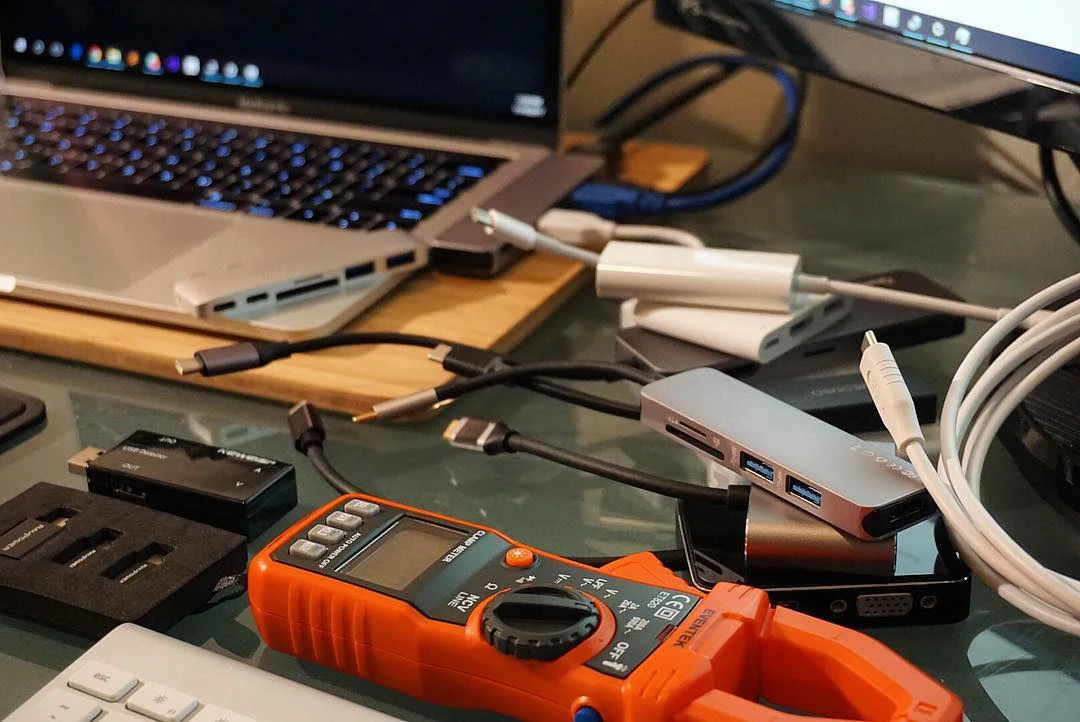
USB-C PD: Fixed PDO, PPS & E-Marker Cables
How USB-C PD (USB Power Delivery) negotiates Fixed Supply PDO, PPS, and AVS profiles, e-Marker cable limits, and multiport hub pass-through power reserves.
Read technical guide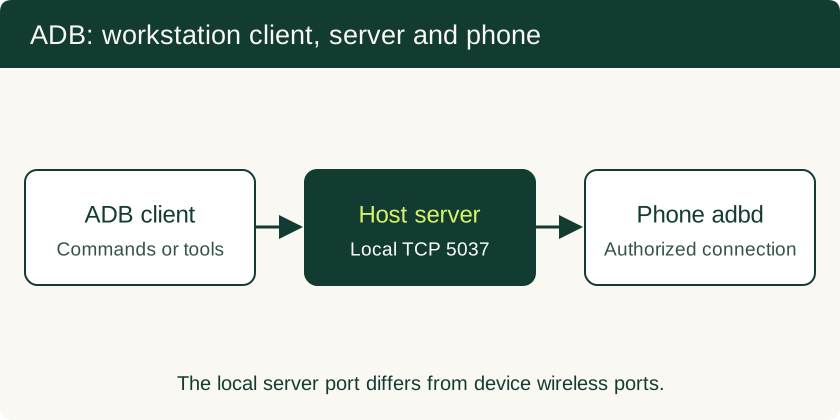
USB Debugging on Android: ADB Authorization, Wireless Pairing and Safe Recovery
Set up trusted ADB connections, collect diagnostics, use scrcpy appropriately and remove workstation access after troubleshooting.
Read technical guide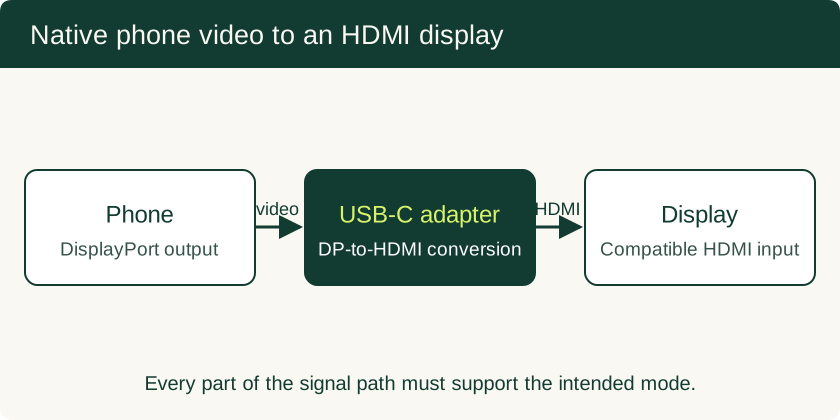
USB-C to HDMI Adapter for Phone: Compatibility and Black-Screen Checks
Check native video support separately from USB data speed, choose the right adapter, and understand powered docks and DisplayLink alternatives.
Read technical guide