MAM vs MDM: App Policies vs Device Control
Compare MAM and MDM across enrollment, selective wipe, browsing privacy, Android vs iOS app protection policies, and hybrid Microsoft Intune setups.
Mobile Application Management (MAM) secures corporate data inside individual business apps—using identity-bound encryption, copy-paste barriers, and app-level selective wipe—without enrolling the phone. Mobile Device Management (MDM) enrolls the entire handset through an on-device management agent to enforce OS compliance, Wi-Fi, VPN, certificates, app deployment, and full-device wipe.
Use unenrolled MAM when employees access email and documents on personal BYOD phones and reject full device enrollment. Use MDM—ideally paired with MAM—on company-owned smartphones, shared or kiosk fleets, and any device requiring automatic app deployment, enterprise certificates, or pushed Wi-Fi and VPN profiles.
| Dimension | MAM (Unenrolled App Protection) | MDM (Full Device Enrollment) |
|---|---|---|
| Device enrollment required | No device enrollment required; identity-bound | Yes; requires enrolling the phone and installing a client agent |
| Primary control boundary | Corporate work context inside SDK-enabled or wrapped apps | Entire operating system, device policies, and hardware lifecycle |
| Data encryption layer | 256-bit AES app-layer encryption (FIPS 140-2 validated on Android) | Device encryption and cryptographic containerization (1,000+ CMVP modules) |
| Wipe scope | MAM selective wipe of corporate app data only (30-min active poll) | Selective corporate retire or full factory-reset device wipe |
| Wi-Fi, VPN, and certificates | Not provisioned on unenrolled devices | Pushed over the air via corporate profiles and certificates |
| Automatic app pushing | Not pushed automatically; users install apps from app stores | Automated over-the-air deployment via an enterprise app catalog |
| Best ownership fit | Personal BYOD smartphones and tablets | Company-owned phones, regulated assets, and user-less kiosk fleets |
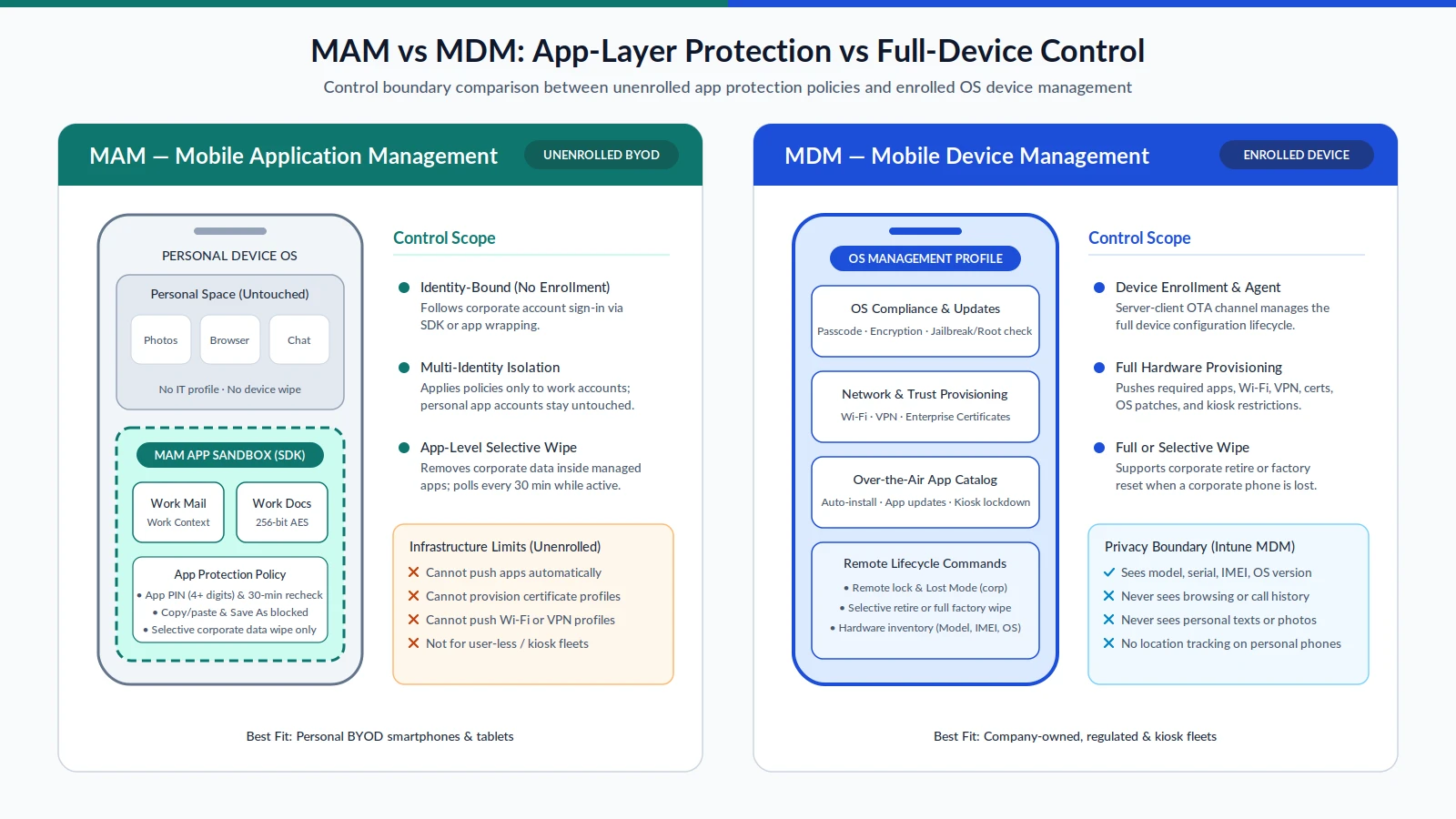
What does MAM do inside enterprise mobility management?
Inside enterprise mobility management (EMM), mobile application management provides granular application-level controls that provision business apps, govern how corporate data moves between apps, and selectively wipe cached work data without requiring device enrollment. EMM combines MAM with mobile device management, BYOD workflows, mobile information management, and mobile content management, whereas Unified Endpoint Management (UEM) extends administration to desktops, printers, IoT devices, and wearables.
MAM software governs both internally developed and commercial mobile apps across company-provided and personal smartphones and tablets. Rather than anchoring policies to hardware ownership, MAM centers management on the user’s corporate identity. In multi-identity productivity apps, Microsoft Intune applies app protection policies exclusively inside the work account context, leaving personal accounts and personal files untouched.
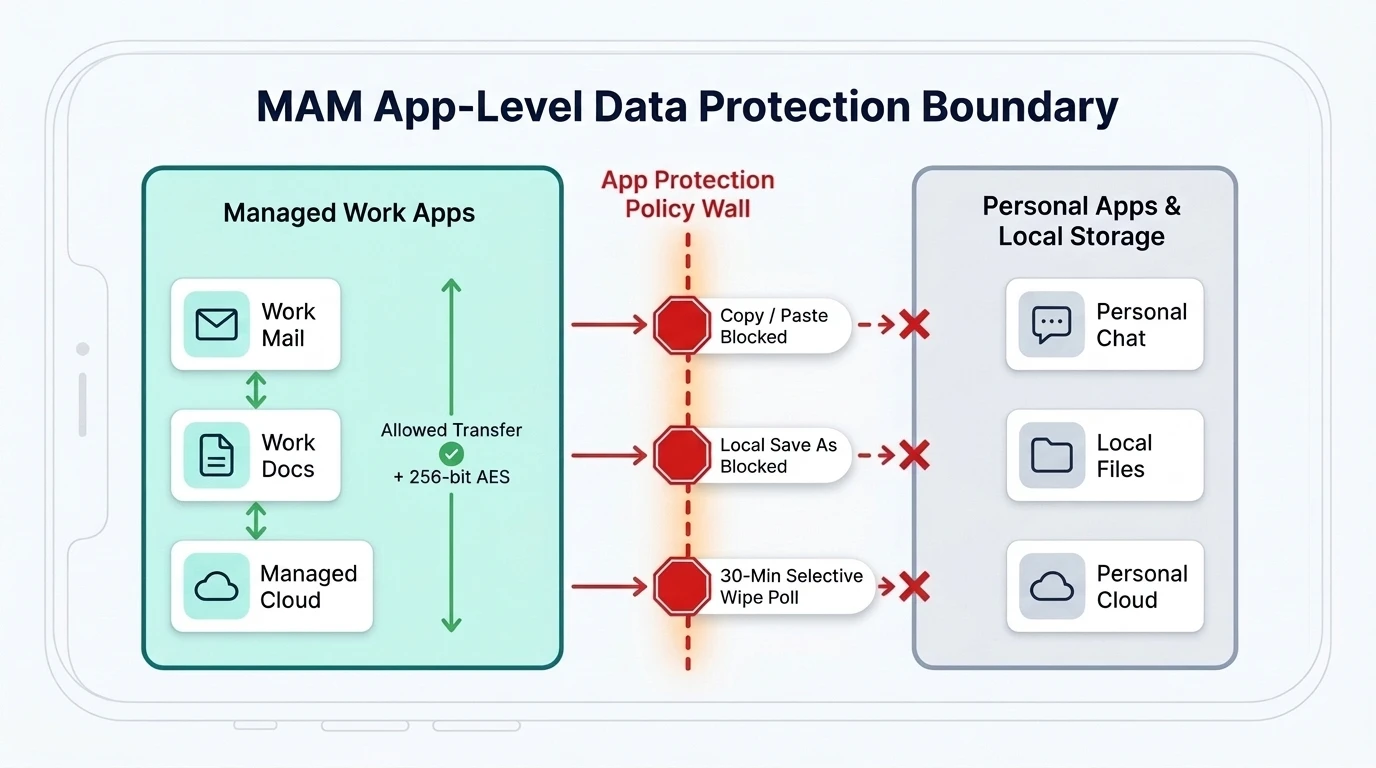
Organizations enforce MAM controls through two technical integration methods: embedding a vendor software development kit (SDK) during app development or applying an app wrapping tool afterward to inject policy hooks. In Microsoft Intune, any app integrated with the Intune SDK or wrapped with the Intune App Wrapping Tool can enforce access, encryption, and data-relocation controls—such as restricting clipboard copy-and-paste to policy-managed apps, blocking Save As to unmanaged local storage while allowing approved repositories like OneDrive, SharePoint, Box, iManage, or Egnyte, and selectively wiping cached corporate data when a phone is lost, stolen, or an employee leaves.
What does MDM control at the device level in IT?
In enterprise IT, mobile device management combines a backend management server, an on-device client agent, corporate configuration profiles, and certificates to control the entire smartphone lifecycle over the air. Administrators use MDM to configure single phones or entire fleets consistently, enforce compliance rules, push OS and software updates, troubleshoot remotely, and lock or wipe lost hardware.
At the operating-system layer, MDM controls settings that app-level tools cannot reach on unenrolled handsets. Core MDM capabilities include pushing pre-defined Wi-Fi and hotspot profiles, configuring corporate VPN tunnels, deploying digital certificates, distributing commercial or private apps through an enterprise application catalog, detecting jailbroken or rooted devices, disabling native apps, and locking down dedicated hardware into kiosk mode.
Device-level security also relies on validated cryptography and lifecycle governance. As of 2026, NIST’s Cryptographic Module Validation Program (CMVP) lists over 1,000 active cryptographic modules usable for MDM container protection. For lifecycle planning across both company-provided and personally owned fleets, NIST SP 800-124 Rev. 2—published in May 2023 and superseding Revision 1 from June 2013—provides recommendations spanning device deployment, operation, and disposal. To map those controls to ownership models, see the enterprise mobile security overview and our small-business MDM rollout guide.
Can MDM see personal browsing history compared with MAM?
No—even on a phone fully enrolled in Microsoft Intune MDM, the organization can never see personal calling history, web browsing history, personal email, text messages, personal contacts, calendar entries, passwords, camera-roll photos, or the contents of user-created documents. The real privacy gap between MDM and unenrolled MAM lies in hardware telemetry and app inventory, not personal browsing surveillance.
When a user enrolls a phone in Intune MDM, IT administrators and support staff always gain visibility into hardware and OS inventory fields—specifically device owner, device name, serial number, device model, manufacturer, operating system version, and device IMEI. Phone number visibility depends on ownership and profile mode: Intune displays the full phone number on standard corporate-owned devices, but masks it to only the last four digits on personal devices and on corporate-owned Android work-profile devices. Location tracking is restricted to lost corporate-owned devices (such as Apple managed lost mode) and is not visible to IT on personal phones.
| Telemetry or data category | Unenrolled MAM (App Protection) | Intune MDM (Personal BYOD) | Intune MDM (Corporate-Owned) |
|---|---|---|---|
| Web browsing and call history | Not collected without enrollment | Never visible to IT | Excluded from Intune admin visibility |
| Personal email, SMS, photos, passwords | Untouched outside managed work apps | Never visible to IT | Excluded from Intune admin visibility |
| Model, serial number, IMEI, OS version | Not enrolled for full MDM inventory | Always visible to IT | Always visible to IT |
| Phone number | Not enrolled for MDM inventory | Last four digits only | Full number (last four digits on Android work profile) |
| Device location | Not tracked | Not visible to IT | Visible only on lost corporate devices |
| Installed app inventory | Managed corporate apps only | Managed app inventory (some configs expose more) | Work-profile apps on Android work profile; all apps on other corporate phones |
Because unenrolled MAM never installs an MDM device profile, employees who worry about exposing hardware serial numbers, IMEI identifiers, or broader app lists often accept MAM on personal phones far more readily than device enrollment. For a deeper breakdown of container visibility on Android handsets, review our Android Work Profile privacy and setup guide.
What are the pros and cons of MAM vs MDM for BYOD phones?
For personal BYOD phones, unenrolled MAM eliminates employee enrollment resistance and protects corporate accounts without risking a full-device factory wipe, while MDM delivers automated app deployment, certificate provisioning, and corporate network profiles that MAM alone cannot supply. Choosing the wrong model either stalls BYOD adoption or leaves unmanaged infrastructure gaps on company assets.
Where unenrolled MAM wins—and where it stops
Unenrolled MAM is built for personal smartphones where employees refuse full device enrollment but still need corporate email, chat, and document access. It deploys quickly through identity sign-in, keeps personal apps isolated from corporate restrictions, and confines offboarding to a MAM selective wipe that removes only corporate accounts and cached work data inside managed apps.
However, Microsoft Intune documentation highlights three concrete infrastructure limits on unenrolled MAM devices:
- No automated app push: IT cannot silently deploy apps to the handset; employees must download business apps themselves from public app stores or the Company Portal.
- No certificate provisioning: Enterprise authentication certificates cannot be provisioned to unenrolled devices.
- No Wi-Fi or VPN profile push: Corporate Wi-Fi credentials and VPN configurations are not pushed automatically without MDM enrollment.
Why company-owned and kiosk fleets require MDM
Microsoft explicitly recommends against using MAM as the sole management method on organization-owned smartphones or user-less shared and kiosk devices. Because MAM centers on an individual signed-in user identity, dedicated single-purpose devices and company-owned hardware require MDM enrollment for OS lifecycle control, full-device wipe capability, and cellular or hardware provisioning (see our company phone fleet eSIM vs physical SIM guide for carrier line provisioning).
Wipe behavior also separates the two models. Intune supports three wipe scopes: full device wipe (restoring factory defaults and erasing all personal and work data), MDM selective wipe (retiring corporate profiles and managed apps), and MAM selective wipe (removing only corporate data inside managed apps). Full device wipe and MDM selective wipe operate only on MDM-enrolled phones. Under MAM selective wipe, the Intune SDK checks for a wipe command at app launch and corporate sign-in, and polls every 30 minutes while the user is active inside the app.
How do MAM and MDM policies differ on Android and iOS?
While both Android and iOS share core Microsoft Intune app protection defaults—including 256-bit AES encryption, a 4-digit minimum PIN, 5 maximum PIN attempts, a 30-minute inactivity recheck, a 1,440-minute (24-hour) offline access block, and a 90-day offline wipe—the two operating systems diverge sharply in broker apps, PIN sharing, reboot timers, share-extension handling, and hardware attestation.
Default access, encryption, and offline policy thresholds
Intune app protection policies organize controls into data relocation, access requirements, and conditional launch. When clipboard restrictions are enabled—choosing among Blocked, Policy managed apps, Policy managed with paste in, or Any app—the character-limit exception for unmanaged apps defaults to 0 characters. When Simple PIN is set to Block, Intune evaluates PINs in three-character sliding windows to reject sequences such as 1235 or 1112 while allowing patterns like 1122.
| Shared Intune MAM policy control | Default measured threshold |
|---|---|
| Minimum PIN length & max PIN attempts | 4-digit numeric PIN; 5 max attempts |
| Inactivity recheck & PIN reset interval | 30-minute inactivity recheck; 90-day reset when enabled |
| Offline grace period (access block / wipe) | 1,440 minutes (24 hours) block; 90 days selective wipe |
| Unmanaged clipboard character limit | 0 characters |
| Platform-specific parameter | iOS / iPadOS (Intune MAM) | Android (Intune MAM) |
|---|---|---|
| Required broker app (unenrolled) | Broker app such as Microsoft Authenticator | Intune Company Portal (plus Microsoft Entra ID registration for Microsoft 365 apps) |
| App data encryption | Device-level encryption while locked plus optional 256-bit AES via Intune APP SDK | Synchronous file I/O 256-bit AES via wolfSSL and Android Keystore (FIPS 140-2 validated; legacy 128-bit readable) |
| PIN sharing & reboot timer behavior | Shared per app publisher; inactivity timer survives reboot | Shared across all managed apps; timer resets on reboot |
Configuring the offline access block below 30 minutes is discouraged on both platforms because frequent policy refreshes interrupt users during normal app launches and resumes.
Platform-specific enforcement on Android versus iOS
Operating-system sandboxing creates distinct enforcement boundaries when devices are not enrolled in MDM:
- iOS share extension encryption: Without MDM enrollment, Intune MAM cannot suppress the native iOS or iPadOS share extension. Instead, Intune encrypts corporate files exported through the share sheet so unmanaged apps cannot read them.
- iOS screen capture and keyboards: Blocking screenshots, screen recording, Teams or Zoom screen sharing, AirPlay mirroring, QuickTime mirroring, and Siri onscreen awareness requires Intune SDK v19.7.12 or later for Xcode 15 or v20.4.0 or later for Xcode 16. Blocking third-party keyboards inside managed iOS apps requires Intune SDK 12.0.16 or later and applies to both work and personal accounts inside multi-identity apps while leaving unmanaged apps unchanged.
- Android hardware attestation and lock checks: On Android, Intune MAM can require Google Play Integrity hardware-backed strong integrity checks on devices shipped with Android 8.1 and later, and can verify OS device lock complexity (Low, Medium, or High) on Android 12 and later (Android 11 and earlier default to Low Complexity).
- Android screen capture, keyboards, and broker lifecycle: Blocking screen capture on Android also blocks Circle to Search and Google Assistant access to organizational data while blurring the app-switcher preview. Approved Play Store keyboards require Android Intune SDK 6.2.0 or later. Because Android MAM depends on the Intune Company Portal, administrators can enforce a maximum Company Portal version age between 0 and 365 days; support for Android Company Portal versions earlier than 5.0.5421.0 ended on October 1, 2025.
Can organizations combine MAM and MDM in Microsoft Intune?
Yes—Microsoft Intune is explicitly designed to run MDM and MAM together on the same fleet, layering device-level enrollment and compliance with app-level data-loss prevention while simultaneously protecting unenrolled BYOD phones with MAM alone. An employee can carry a company-issued smartphone governed by both MDM and MAM alongside a personal tablet protected only by MAM policies.
Intune app protection policies work across three device states: devices enrolled in Microsoft Intune, devices enrolled in a third-party MDM solution, and unenrolled personal devices. To ensure users cannot bypass app protection by signing into unprotected clients, Microsoft instructs administrators to pair Intune app protection policies with Conditional Access. Administrators can also target separate policies by device management state—applying a lighter MAM policy to MDM-managed phones and a stricter MAM policy to unenrolled BYOD handsets.
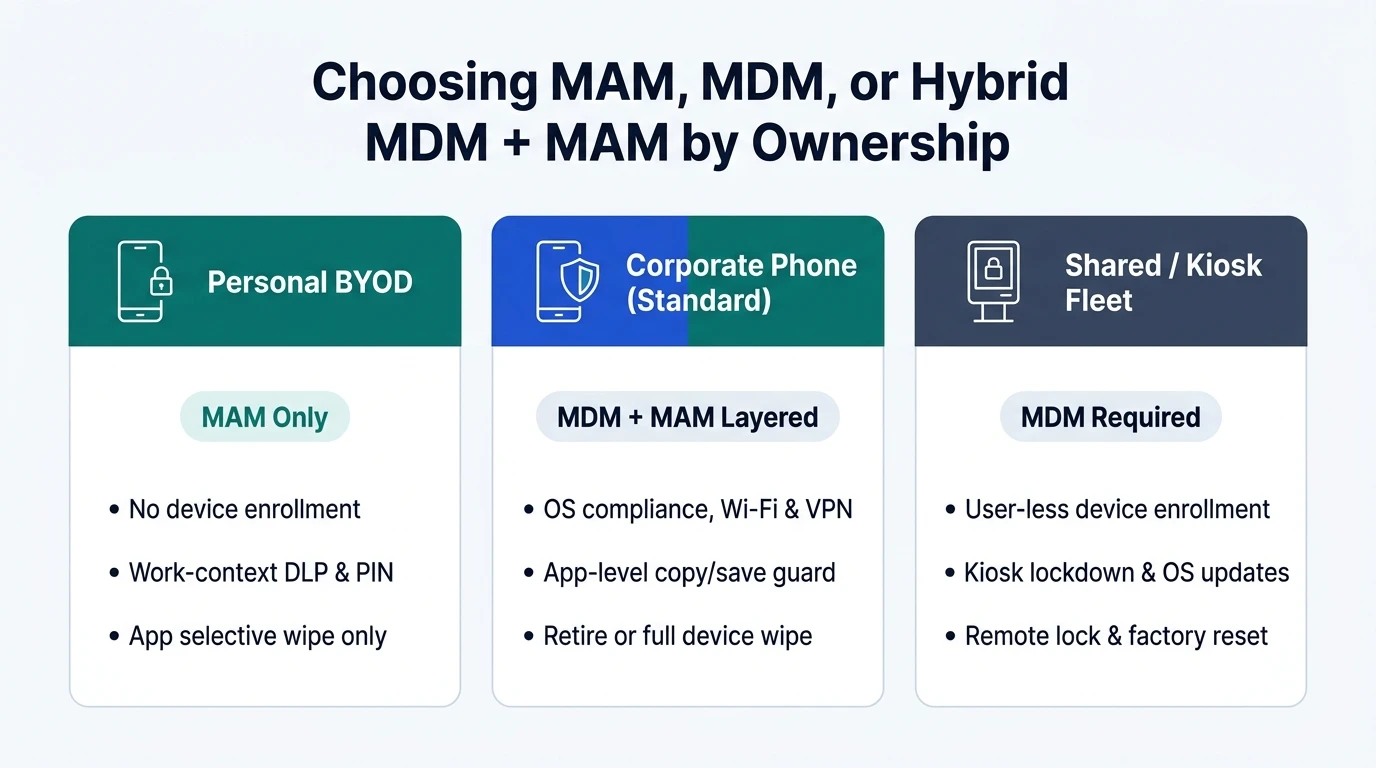
Combining MDM with MAM unlocks coordinated behaviors unavailable to unenrolled devices:
- Eliminating double PIN prompts: On enrolled devices, administrators can disable the redundant app-level PIN once an OS device lock is detected (requiring iOS SDK 7.0.1 or later with IntuneMAMUPN configured on iOS, or Company Portal on Android).
- OS-integrated iOS sharing: On MDM-enrolled iOS and iPadOS devices, the transfer setting “Policy managed apps with OS sharing” integrates with Apple’s managed Open-In controls; on unenrolled devices it automatically falls back to standard policy-managed app transfer.
- Tiered security baselines: Microsoft’s three-level App Protection Data Protection Framework scales from Level 1 (Basic: PIN, encryption, selective wipe, and Android attestation) to Level 2 (Enhanced: data-leakage prevention and minimum OS rules) and Level 3 (High: advanced DLP, enhanced PIN, and Mobile Threat Defense).
| Ownership and fleet scenario | Recommended model | Primary controls active | Offboarding action |
|---|---|---|---|
| Personal BYOD phone or tablet | Unenrolled MAM + Conditional Access | Identity-bound 256-bit AES encryption, clipboard and Save As blocks, app PIN | MAM selective wipe of corporate app data only |
| Company-owned standard phone | MDM + MAM layered | OS compliance, pushed Wi-Fi/VPN/certs, enterprise app catalog, plus app-level DLP | MDM retire or full factory wipe plus session revocation |
| Shared frontline or kiosk device | MDM required | User-less enrollment, kiosk lockdown, OS update control, remote lock | Remote lock and factory reset for reassignment |
Frequently asked questions about MAM vs MDM
Does MAM require enrolling my personal phone in MDM?
No. MAM for unenrolled devices applies app configuration profiles and app protection policies directly to corporate accounts inside managed apps without installing an MDM device profile. Users only need the required platform broker app—Microsoft Authenticator on iOS or the Intune Company Portal on Android (plus Microsoft Entra ID registration for Microsoft 365 apps on Android).
Can my employer wipe my personal photos or apps with MAM?
No. MAM supports only app-level selective wipe, which deletes corporate accounts and locally cached work data inside managed apps while leaving personal apps, photos, and personal accounts untouched. Full-device factory wipe and MDM selective wipe require MDM device enrollment.
How fast does a MAM selective wipe execute after IT triggers it?
If the user is actively using a managed app when IT initiates a selective wipe, the Intune SDK polls the Intune MAM service every 30 minutes for pending wipe commands. The SDK also checks for a wipe request immediately upon first app launch and corporate sign-in.
Can IT push corporate Wi-Fi, VPN, or certificates using MAM alone?
No. On unenrolled devices managed solely by MAM, IT cannot push applications automatically, provision certificate profiles, or deploy corporate Wi-Fi and VPN settings. Any workflow requiring those network or trust profiles requires MDM enrollment.
Should company-owned phones use MDM, MAM, or both?
Use both MDM and MAM together on company-owned user smartphones. MDM enforces OS updates, compliance, certificates, Wi-Fi/VPN profiles, app deployment, and full-device recovery, while MAM adds granular in-app data protection—blocking copy-paste and unmanaged Save As exports—and can suppress duplicate app PIN prompts once an OS lock is present.
Related Technical Guides
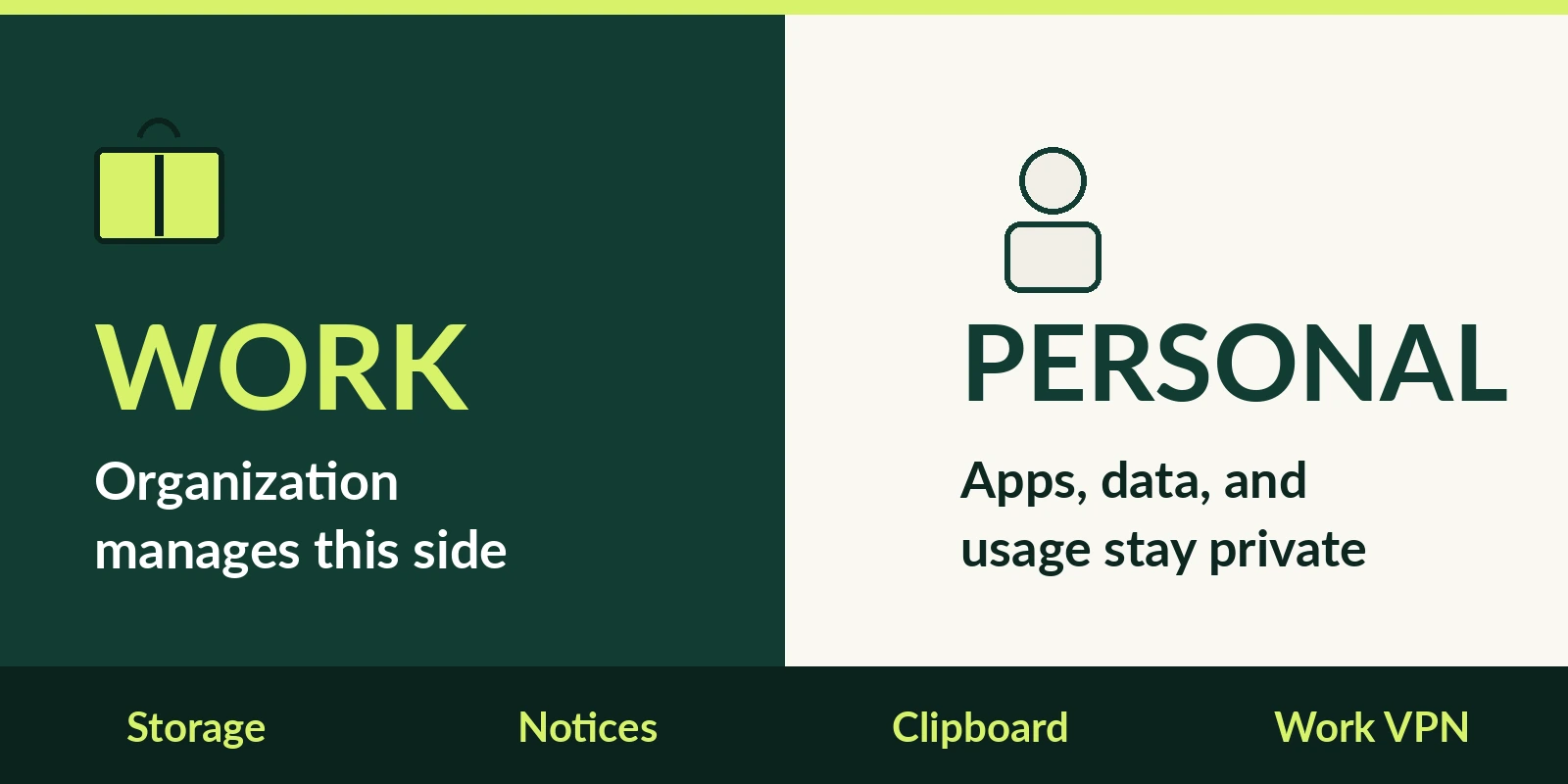
Android Work Profile: Privacy and Setup
Android Work Profile separates work apps and data from personal apps and data. Personal usage stays private while the organization manages the work side.
Read technical guide
eSIM vs Physical SIM for Phone Fleets
Compare eSIM and physical SIM architecture, SM-DP+ remote provisioning, MDM anti-tamper policies, Dual-SIM Dual-Standby routing, and broken-phone swap workflows.
Read technical guide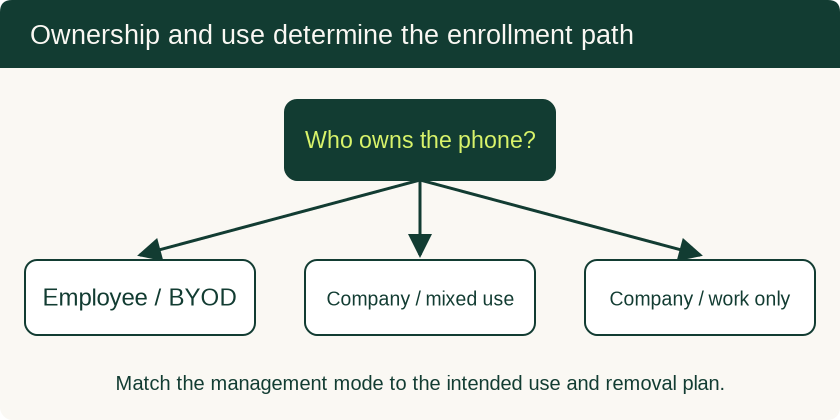
Mobile Device Management for Small Business: BYOD and Company-Owned Setup
Compare enrollment choices, evaluate MDM costs and controls, pilot deployment and test removal of work data before a wider rollout.
Read technical guide